您的IP: 216.73.216.129
United States of America, Columbus
您尚未受保护
Red Shield VPNRed Shield VPN
🇬🇧 English🇷🇺 Русский
订阅
  • 关于
  • 应用
  • 节点
  • 价格
  • 帮助
  • 账户
  • Applications
    • Android
      • Installation and use
      • Problem solving
        • VPN sometimes disconnects
    • iOS (iPhone / iPad)
      • Installation and use
    • Windows
      • Installation and use
      • Split Tunneling
    • macOS
      • Installation and use
      • Kill Switch and VPN Only Access
  • VPN Setup on Routers
    • Keenetic
      • Wireguard on Keenetic
    • Mikrotik
      • Wireguard on Mikrotik
    • OpenWrt
      • WireGuard on OpenWrt
      • VLESS on OpenWrt (Podkop)
      • AmneziaWG 2 on OpenWrt (Podkop)
  • VPN Setup on Linux
    • VLESS on Ubuntu & Debian with GUI
    • AmneziaWG 2 on Ubuntu & Debian
    • WireGuard on Ubuntu with GUI
    • WireGuard on Ubuntu & Debian CLI
  • Support & FAQ
    • ❓ Answers to frequently asked questions
    • Support
  • Red Shield VPN
    • About
    • What is VPN?
    • Bug Bounty
    • Warrant Canary
    • Terms of Service
    • Refund Policy
    • Privacy Policy
    • Auto-renewal Terms
  • Features
    • RedLink Protocols
    • Double VPN
    • IPv6 leak protection
    • DNS leak protection
    • Kill Switch

在iOS上安装和使用VPN


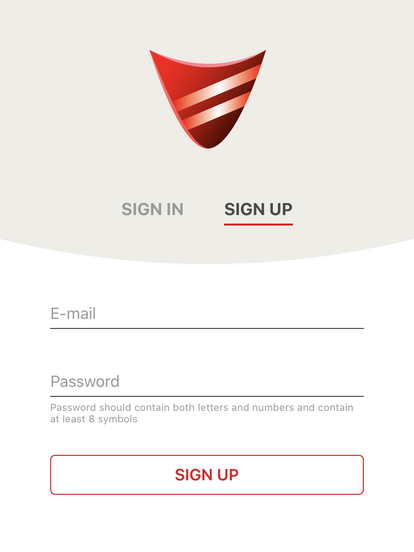
1. 安装并运行 Red Shield VPN 应用。要注册,请输入您的邮箱和密码;如果您已在 Red Shield VPN 注册,请使用已有账户登录。


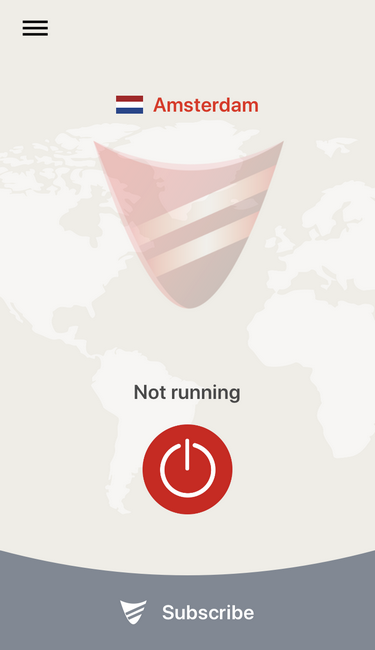
2. 如果尚未付款,请点击 “Subscribe Now” 按钮来支付订阅费用。付款完成后,点击连接按钮。


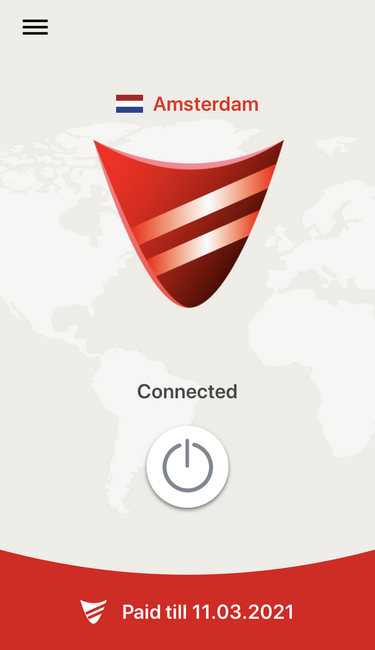
3. 如果连接成功,状态会变为 “Connected”。要断开连接,请点击中间的按钮。


Red Shield VPN
  • 关于
  • 价格
  • 应用
  • 节点
  • 账户
帮助
  • 什么是 VPN
  • 常见问题
  • 支持
  • Terms of Service
  • Privacy Policy
  • Refund Policy

© 2017-2026, Red Shield VPN
保留所有权利

Private Network Labs LLC
2171 SPRING STREET
HAMILTON, NY, 13346


contact@redshieldvpn.com